Message taking service

Professional Message Taking When Nobody Can Answer

The receptionist answers with your approved greeting, captures the caller’s details and message, and sends your team a clear summary for follow-up.

  • Captures caller name, number and message
  • Answers basic questions using configured business facts
  • Records urgency and requested next action
  • Runs for 24 hours from activation
View pricing

Why businesses use message taking

Stop unanswered calls becoming lost messages

Callers receive a professional answer rather than voicemail, while your team receives the details needed to respond.

The problem

What goes wrong when nobody answers

Callers give up

Potential customers may contact another business rather than leave voicemail.

?

Messages lack detail

Names, numbers and the real reason for calling may be incomplete.

!

Follow-up is delayed

The team cannot prioritise the enquiry without a clear summary.

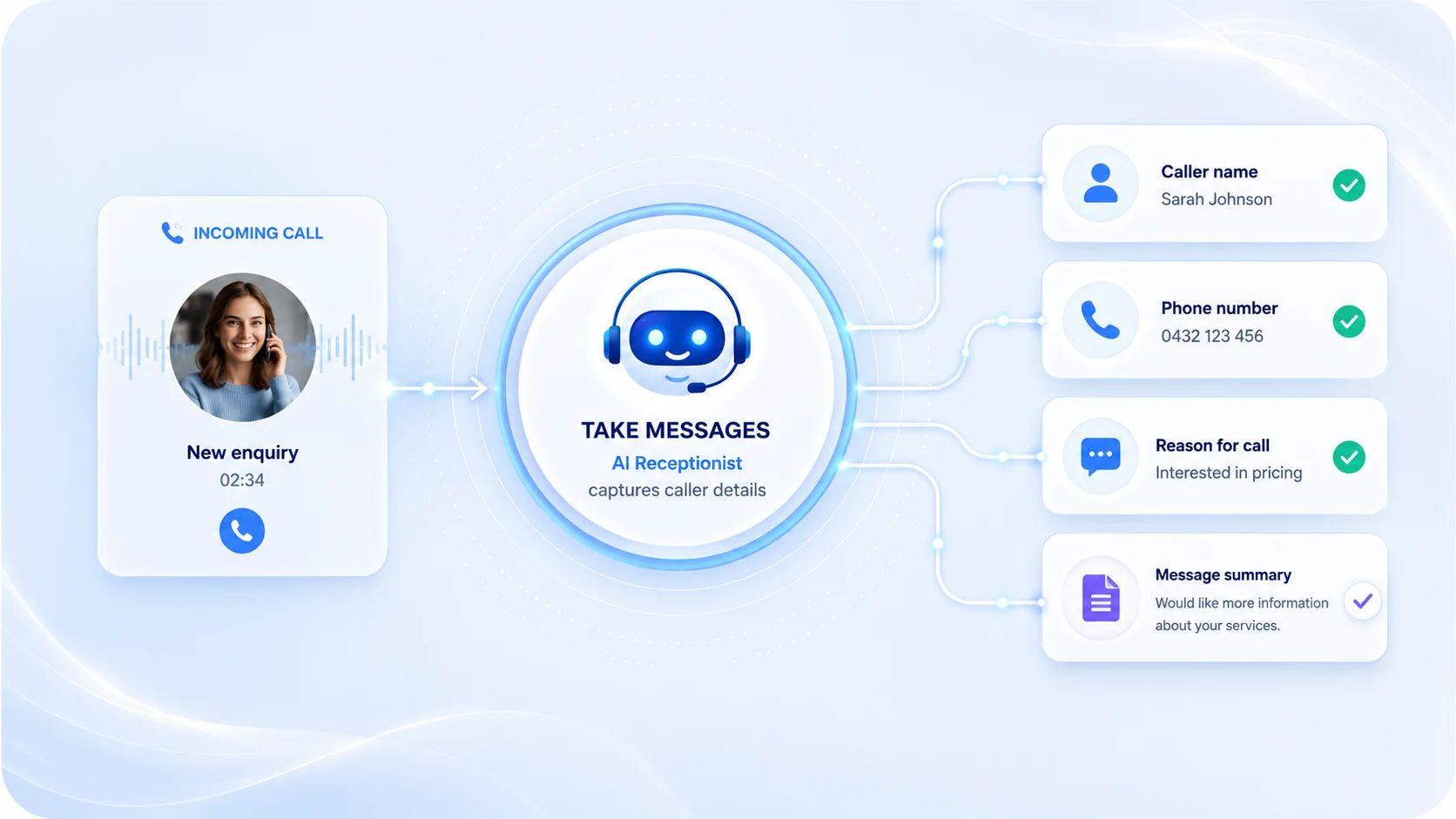
Message Taking flow showing caller details captured and sent to the business
The receptionist captures who called, why they called and how the team should respond.

How it works

From incoming call to clear message summary

  1. 1

    Caller rings

    The receptionist answers using your approved greeting.

  2. 2

    The need is understood

    The caller explains why they are contacting the business.

  3. 3

    Details are captured

    Name, contact number, message and selected extra details are recorded.

  4. 4

    The summary is sent

    Your chosen contacts receive the information needed for follow-up.

Configured around your business

What Message Taking can collect

Choose the caller information and message details the receptionist should capture before sending the handover to your team.

ID

Caller details

Collect the caller’s name, telephone number and other selected information.

Message content

Record what the caller needs and the important context behind the call.

?

Basic business questions

Answer configured questions such as hours, website, location and contact process.

!

Urgency

Record whether the caller considers the enquiry urgent or time-sensitive.

Preferred follow-up

Capture whether the caller wants a return call, email or another next step.

Useful extra notes

Record selected details relevant to the type of calls your business receives.

Temporary message cover

Message taking for the days your team cannot answer

Use it for short-term cover without adding another permanent monthly service.

Why One Day Receptionist

Cover only when you need it

One Day Receptionist

  • Cover from £50
  • Runs for 24 hours
  • Quick online setup
  • No subscription
  • Setup saved for reuse

Ongoing service

  • Recurring monthly cost
  • Longer onboarding
  • Permanent arrangement
  • Continuous commitment
  • May require a contract

Common use cases

When businesses use message cover

Sole tradersCapture calls while working or driving.
Small teamsTake messages while everyone is occupied.
Mobile servicesKeep enquiries covered while staff are on jobs.
Clinics and salonsCapture calls while staff are with clients.
Staff absenceProvide cover during unexpected sickness.
Annual leaveKeep messages organised while reception is away.
Training daysProtect calls while the team is unavailable.
Busy periodsReduce missed enquiries during call spikes.

Real-life message example

See how one call becomes a complete message

The receptionist captures the caller’s details, understands the reason for the call and sends a structured summary to the business.

1

Caller enquiry

Alex asks for a quotation

“I’m looking for a quote and would like somebody to call me back after three this afternoon.”
CallerAlex Morgan
Number07700 900 246
ReasonRequesting a quotation
Best timeAfter 3pm
2

Information captured

The message is structured clearly

ID
Contact detailsName and number confirmed
?
Reason for callingQuotation request
Requested actionReturn call required
Preferred timeAfter 3pm
3

Message check

The key follow-up details are present

  • ✓ Caller identity captured
  • ✓ Contact number confirmed
  • ✓ Reason for calling recorded
  • ✓ Preferred callback time noted
Ready for follow-up The team has enough information to respond properly
4

Message delivered

The business receives the handover

SMS alert 12:46

New message from Alex Morgan. Quotation request. Please call 07700 900 246 after 3pm.

Email summary 12:46

Alex Morgan called requesting a quotation and would like a return call after 3pm. Contact number confirmed successfully.

The team can follow up without replaying the call or chasing missing details.

Setup walkthrough

Set up Message Taking in a few minutes

Add your business facts, choose the message details to capture and configure the greeting callers should hear.

  1. 1
    Choose Take Messages

    Select the correct receptionist type.

  2. 2
    Add business facts

    Enter the information callers may ask about.

  3. 3
    Choose what to capture

    Select the caller and message details required.

  4. 4
    Set the greeting

    Review the opening and closing wording before activation.

Message taking guide

What is a business message taking service?

A message taking service answers calls when the business cannot, records the caller’s details and reason for calling, and sends a structured summary to the chosen contacts.

How does message taking work?

Calls are forwarded to the temporary receptionist number. The receptionist answers using the configured greeting and asks for the selected caller information.

Once the call is complete, the captured details are organised into a readable summary and sent to the business.

What information can it collect?

Typical fields include the caller’s name, telephone number, reason for calling, message, urgency, preferred contact time and requested next action.

Can it answer basic business questions?

Yes, when the answer has been included in the configured business facts. This may include opening hours, website, location and contact process.

What happens when the answer is not configured?

The receptionist records the question for the team rather than inventing an answer.

When is temporary message cover useful?

It is useful during staff absence, holidays, meetings, training, busy periods and days when the team is working away from the phone.

Can the setup be reused?

Yes. The setup can be saved for 12 months and reviewed before future activation.

Common questions

Message Taking FAQs

Can it take detailed messages?

Yes. You choose the details the receptionist should capture during setup.

Can it answer basic questions?

Yes, when the answer is included in the configured business facts.

Does it replace my main number?

No. You normally forward calls to the temporary receptionist number.

When do I receive the temporary number?

The number is provided after payment and activation.

What happens after 24 hours?

The cover period ends unless the service is reactivated.

Can I reactivate later?

Yes. Your setup can be saved for 12 months for quicker reuse.

Are SMS and email notifications guaranteed?

Delivery depends on correct contact details and third-party providers.

Is it suitable for emergency calls?

No. It should not be used for urgent medical, legal, safety or emergency situations.

Temporary message cover

Need your business calls answered today?

Configure the greeting and message fields, activate 24 hours of cover and receive clear caller summaries from £50.

No subscription. Includes £10 call credit. Fair usage applies.